Approvals and side conversations
Ask a manager to approve an invoice, quote or PO
Use this when a vendor sends an invoice, quote or purchase order and someone has to sign it off before it's paid. Anyone with the Agent role or higher can request an approval.
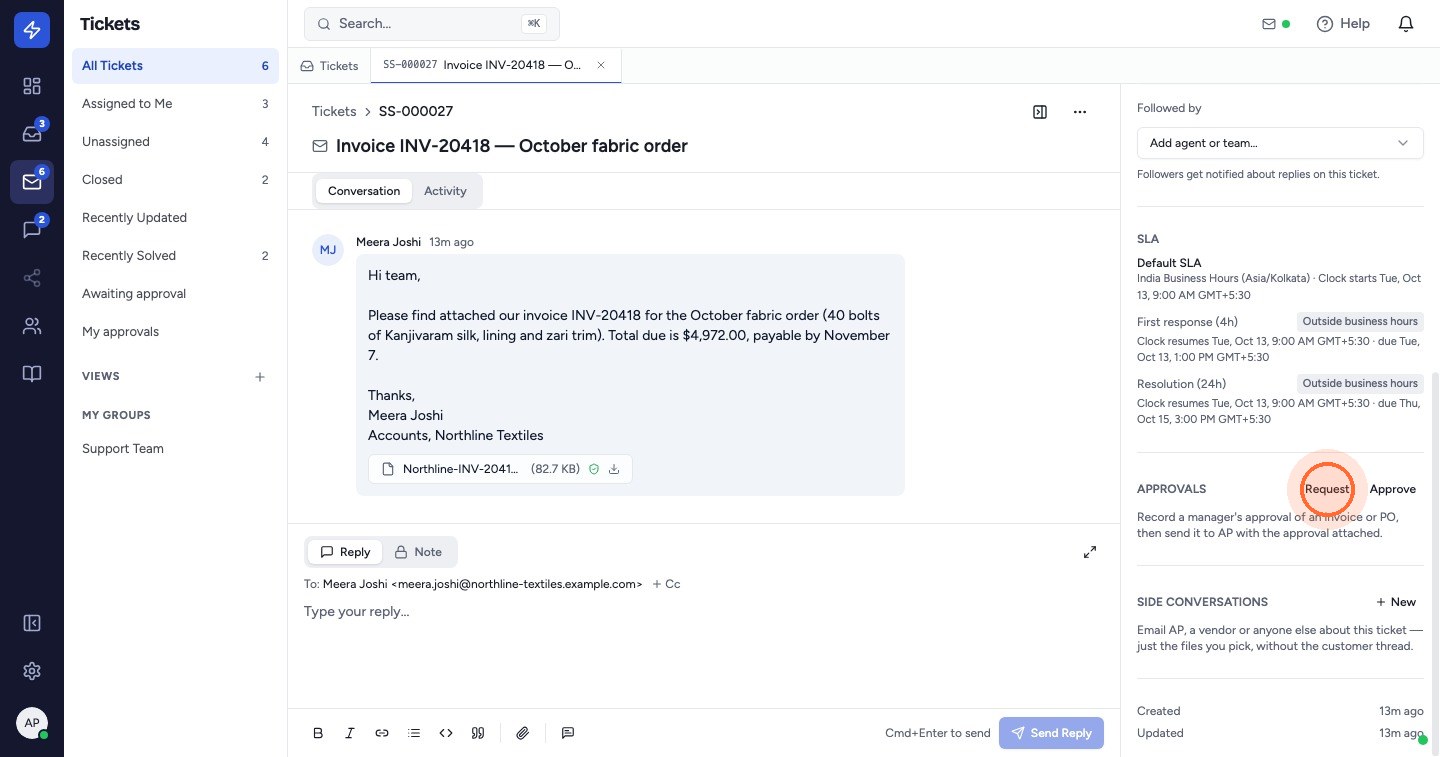
- Open the ticket. In the right sidebar, scroll to Approvals and click Request.
- Choose the Approver.
- Under What's being approved, tick the files the approval covers. If the ticket has no files, the approval covers the ticket itself.
- Add a Note for the approver if it helps, for example the PO number or payment terms.
- Click Send request.
The approver gets a notification in ZippTicket and an email with a one-time link to approve or reject.
Seeing what's waiting
- A banner across the ticket shows Awaiting approval and who it's waiting on.
- In the ticket list, an Awaiting approval chip marks the ticket. The approver sees Needs your approval instead.
- Awaiting approval in the ticket sidebar lists every ticket with a pending approval.
- Home shows how many tickets are awaiting approval.
To withdraw a request, click Cancel request on the banner. The person who asked can cancel it, and so can a Manager, Admin or Owner.
When it's approved, send it on. See Send an invoice to AP with the approval attached.
If you don't see Approvals in the ticket sidebar, approvals aren't switched on for your workspace yet. Contact ZippTicket support.
 Watch the video guideApprove an invoice and send it to APAbout 7 minutes · 20 steps